 Gako
GakoSupervise coding agents across many repositories
Gako is a lean desktop app for a folder of independent Git repositories. See what your agents changed in every one of them, and know which agent needs you. It sits beside your editor, not in place of it.
macOS · Windows · Linux
What it does
One calm window for many repositories and many agents
Microservice codebases, robotics workspaces and polyrepo teams keep their code in many repositories side by side. Editors show them one at a time, or one long panel each. Gako shows you what changed.
Every repository in one view
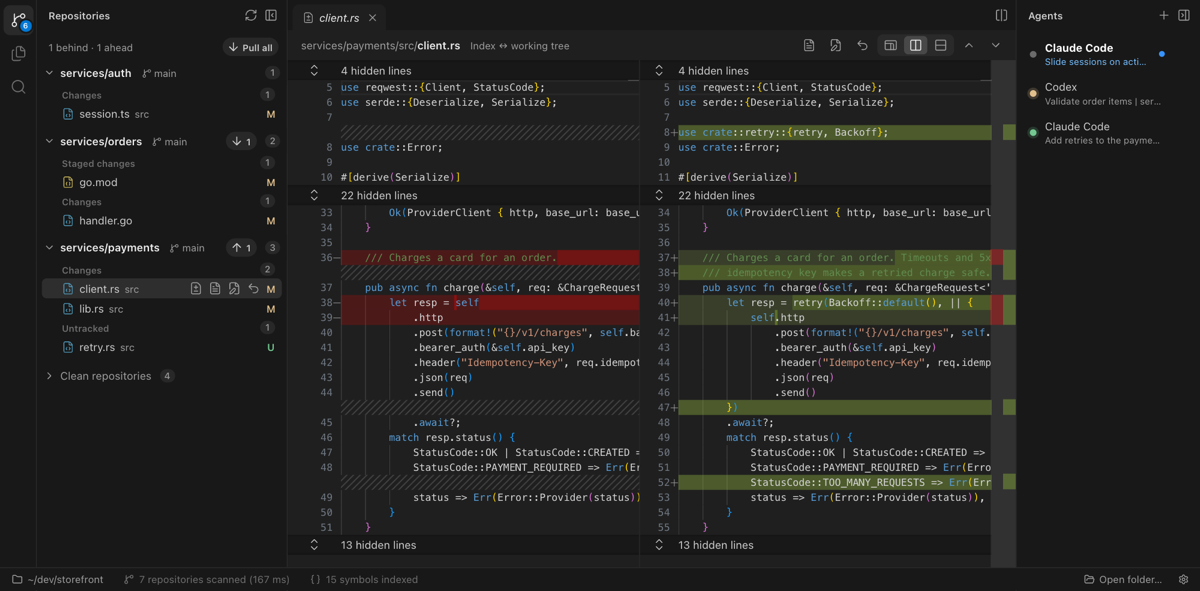
Gako finds the repositories under a folder and lists the ones with changes: branch, sync state, changed files. Clean ones fold away. Fetch, pull, push, switch branch or revert a file from the list.
Agents in real terminals
Claude Code, Codex, OpenCode, Pi or any other program, in any repository, with its own interface untouched. Gako adds the part terminals lack: who's working, who's done, who's waiting for you.
Review, read and search
Read-only diffs and files with VS Code's own editor component, each repository's history, search scoped to the repositories you pick, and go to definition across all of them.
Your editor for editing
Gako never edits code. “Open in editor” takes you to the line in VS Code, Zed, Cursor, Sublime Text or the editor you configure.
Light by design
A Rust core does the heavy lifting: Git, file watching, search, terminals. Gako holds itself to measured budgets against VS Code, and uses a fraction of its memory.
Yours, and only yours
Free software under the GNU AGPL. No accounts, no telemetry, no cloud. Its settings come only from your own file, never from a folder it opens.
Agent supervision
Know which agent needs you, without checking every terminal
Agents tell their terminal what they're doing, in titles and notifications. Gako reads those signals, so the agent bar can show each agent's state at a glance.
- Working while an agent is busy.
- Waiting for you when it asks for approval, including Claude Code's approval prompts on macOS and Linux.
- Finished while you weren't looking, marked until you look.
Measured, not claimed
A fraction of an editor's weight
The same machine, the same workspace, the same terminal settings, measured over the whole process tree. Gako against VS Code:
Measured on a MacBook Air M5 with 16 GB, running macOS. The method, the budgets and every result are in the performance notes.
What it isn't
A companion to your editor, not another one
Install
Download Gako
Gako for macOS, Windows and Linux. Each button opens the latest release: pick the file that ends as shown. The packages aren’t signed by Apple or Microsoft, so your system asks once before opening Gako.
macOS
Apple silicon
Get the .dmg- Open the disk image and drag Gako to Applications.
- Open Gako. When macOS says it can’t verify it, go to System Settings › Privacy & Security and click Open Anyway.
Windows
x64
Get the .zip- Unzip it, and move the
Gakofolder to a local disk, such as%LOCALAPPDATA%\Programs. - Run
Gako.exe. If SmartScreen stops it, click More info, then Run anyway.
Linux
x64
Get the .tar.gz- Unpack it where you’ll keep Gako.
- On Ubuntu 24.04 and later, in the
gakofolder:sudo chown root chrome-sandbox && sudo chmod 4755 chrome-sandbox - Run
./gako.
Every release is on GitHub. To build Gako from source, and for settings and shortcuts, see the README.